How it works Cloud NemoClaw Roadmap Traction Showcase Pricing Mac Install
Real-time observability dashboard for OpenClaw. Open source. Free forever.

Know what your agents
are doing. Right now.

Your OpenClaw agents spawn sub-agents, burn tokens, call tools. You have no idea what they're actually doing. ClawMetry shows you, in real-time.

23k+ installs 107 50+ countries
How it works
View on GitHub →
ClawMetry for OpenClaw - Real-time observability dashboard for OpenClaw AI agents | Product Hunt

What People Say

What the community is saying about ClawMetry

View all →
@jonah_lipsitt
▶ Video
"I got tired of not knowing what my OpenClaw was doing. A Phillips Hue spotlight now shines on my Mac Mini based on what it is doing, further visualized by @clawmetry"
@Save_Delete
"If you are building with OpenClaw, ClawMetry is the missing piece. Real-time visibility into every sub-agent, tool call, token cost, and session log."
@ricardotosatt
"Love this for agent monitoring. Tracking tokens and memory in real time is a huge win for devs."
Product Hunt
#5 Launch Day
"ClawMetry launched alongside Claude Sonnet 4.6 and held #5 all day. Featured in the PH newsletter under 'Keep agents in line.' 198+ upvotes."
@nickvnturi
"This looks like a very helpful tool for tracking agents. Thanks for sharing it."
@Asif2BD
"ClawMetry and our JARVIS Mission Control complement each other. Observability and coordination are separate problems."
@KalariyaHiren1
Thread
"Ask OpenClaw to do something. It starts working. And you just... wait. Hoping. Is it searching? Which websites? Where is it stuck right now? Zero visibility. ClawMetry fixes that."
Mykola Kondratiuk
Mykola Kondratiuk
Product Hunt
"Oh this is exactly what I needed. The biggest pain point has been figuring out where my tokens are going. Especially with sub-agents spawning other sub-agents, costs spiral fast and you have zero visibility."
Damian Saez
Damian Saez
Product Hunt
"Observability for AI agents is something most builders overlook until things break in production. Love that you're tackling this early."
Mihail / HookWatch
Product Hunt
"This is exactly the kind of tooling the AI agent ecosystem needs right now. The per-session cost breakdown is a smart move. Most teams have no idea what their agents actually cost until the invoice hits."
Harsh Upadhyay
Product Hunt
"Really like the clarity of 'Know what your agents are doing. Right now.' The core pain you're solving feels bigger than a single ecosystem. Very clean execution."
@complete_ai_training
Instagram
"On the 19th of February, I discovered 5 exciting new AI tools you won't want to miss: ClawMetry for OpenClaw, Flixier, Your AI Clone, Baseline Core, and STUD."
Omar Diaz
@oadiaz
Medium
"It's like going from 'I think my agents are working' to having a mission control center. The cost tracking alone was worth it. I discovered one agent was using 3x more tokens than necessary."
LinkedIn
Post
"Then I installed ClawMetry. Before ClawMetry: Blind faith. After ClawMetry: Clear visibility."
@jonah_lipsitt
▶ Video
"I got tired of not knowing what my OpenClaw was doing. A Phillips Hue spotlight now shines on my Mac Mini based on what it is doing, further visualized by @clawmetry"
@Save_Delete
"If you are building with OpenClaw, ClawMetry is the missing piece. Real-time visibility into every sub-agent, tool call, token cost, and session log."
@ricardotosatt
"Love this for agent monitoring. Tracking tokens and memory in real time is a huge win for devs."
Product Hunt
#5 Launch Day
"ClawMetry launched alongside Claude Sonnet 4.6 and held #5 all day. Featured in the PH newsletter under 'Keep agents in line.' 198+ upvotes."
@nickvnturi
"This looks like a very helpful tool for tracking agents. Thanks for sharing it."
@Asif2BD
"ClawMetry and our JARVIS Mission Control complement each other. Observability and coordination are separate problems."
View all comments on Product Hunt ↗

Quick Start

๐Ÿค–
Running on KiloClaw or Hostinger? Just ask your agent:
pip install clawmetry && clawmetry connect
Read the guide →
# One command. That's it. 🦞
$ curl -fsSL https://clawmetry.com/install.sh | bash

macOS, Linux, Windows. The installer figures it out.

Here's what it looks like

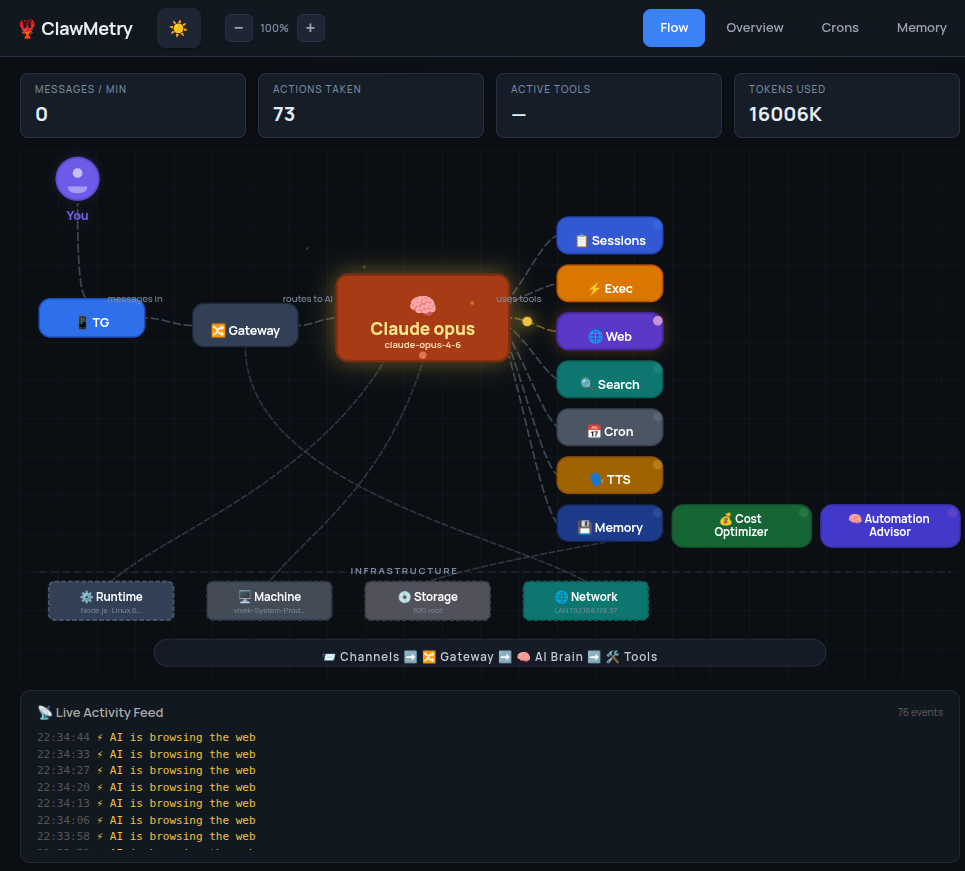
One screen. Everything happening across your agents.

clawmetry - flow
ClawMetry dashboard

What you get

Built because we needed it. Now you don't have to build it yourself.

The big one

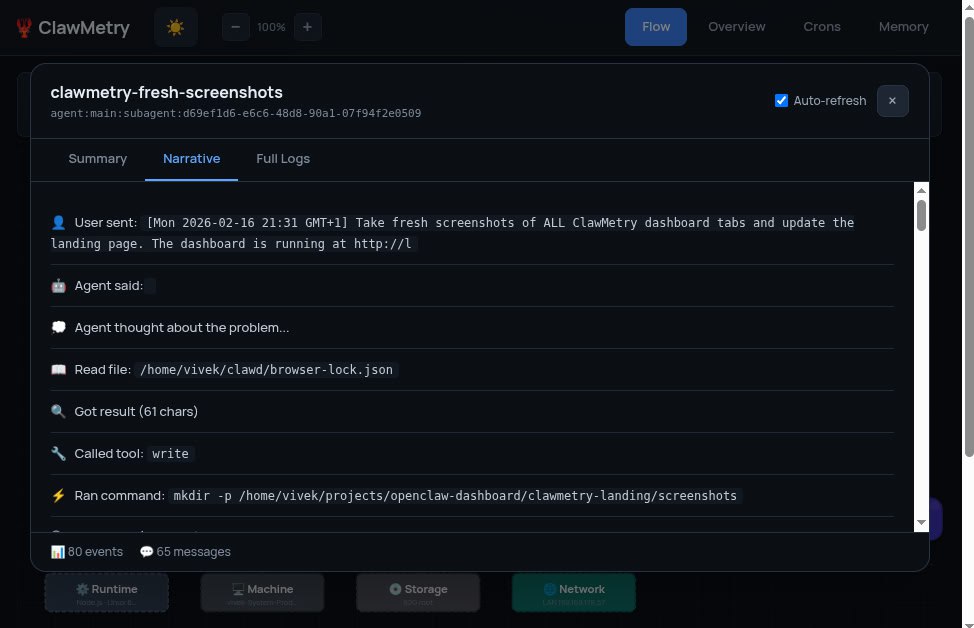
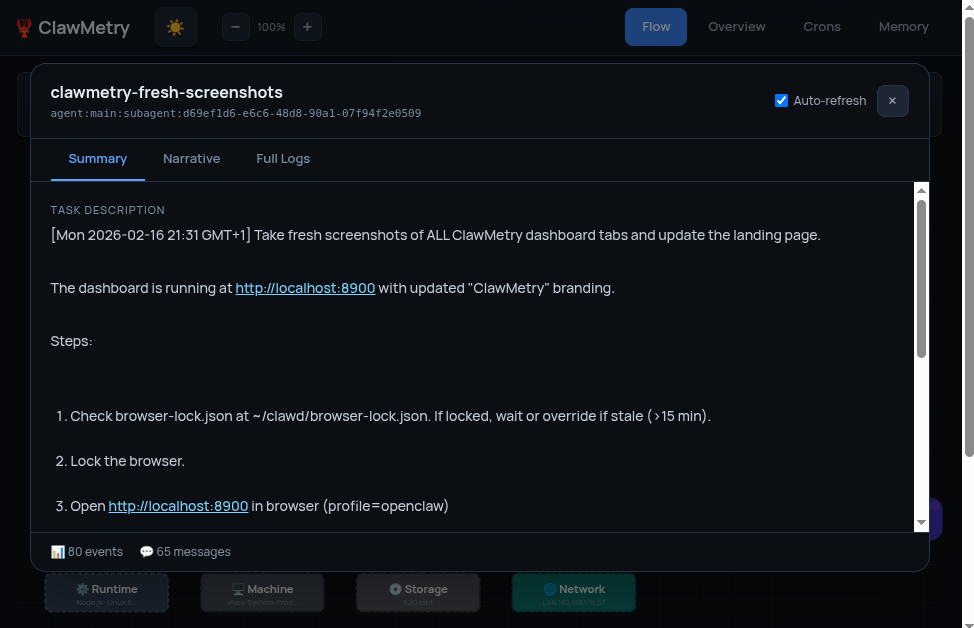
See what every sub-agent is doing. Right now.

Your agent says "spawning sub-agent" and you just... hope it works? ClawMetry shows you every step: what files it's reading, what commands it's running, what tools it's calling, and what it's thinking. Summary, narrative, full logs. No more guessing.

Sub-agent running

Sub-agent running

Sub-agent on completion

Sub-agent on completion

Live flow graph

Channels, gateway, models, tools, nodes. All wired up, updating as things happen.

Token and cost tracking

Tokens in, tokens out, cache hits, response times, cost per call. Numbers you actually need.

System health

Cron jobs, service uptime, disk usage, active sub-agents. Glanceable.

Session history

Every session logged. Timeline, tool calls, cost. Go back and see what happened.

Mission Control integration

Hooks into OpenClaw's task system. See which agents are on which tasks.

Cost breakdown

Per-session, per-model, per-tool. Know what you're spending before the invoice shows up.

Runs where you run

If OpenClaw runs there, ClawMetry runs there. Laptop, server, Raspberry Pi, whatever.

macOS Ubuntu Debian Raspberry Pi Digital Ocean Hostinger Hetzner AWS GCP Windows WSL

Want us to run it for you?

Skip the setup. We host it, you just watch.

🖥
Managed hosting
We set it up. We keep it running. You get full visibility from day one.
📱
Mac, iOS & Android
Menu bar on Mac. Approve requests, check spend, and manage nodes from your pocket.
Human in the loop
Agents pause at key decisions and wait for your approval before continuing.
Start free →

Stay in the loop

Get notified about new features, releases, and the growing -metry ecosystem.

Frequently Asked Questions

Everything you need to know about ClawMetry.

What is ClawMetry?

ClawMetry is a free, open-source real-time observability dashboard for AI agents running on OpenClaw. It gives you instant visibility into token costs, cron jobs, sub-agent activity, memory file changes, and session history โ€” all in a single local dashboard.

Is ClawMetry free?

Yes, completely. ClawMetry is MIT licensed and runs locally on your machine. No cloud dependency, no telemetry, no subscription. There is also an optional ClawMetry Cloud plan for teams who want a hosted multi-node dashboard.

How do I install ClawMetry?

Run pip install clawmetry then clawmetry. It auto-detects your OpenClaw workspace โ€” no config file needed. Setup takes about 30 seconds.

What does ClawMetry monitor?

ClawMetry monitors token usage and cost per session and model, cron job status and history, sub-agent spawns and outcomes, memory file changes (SOUL.md, MEMORY.md, AGENTS.md), session transcripts, channel activity, and real-time tool call traces.

Does ClawMetry work with Claude, GPT-4, and other models?

Yes. ClawMetry works with any model your OpenClaw agents use โ€” Claude (Anthropic), GPT-4 (OpenAI), Gemini (Google), and others. It tracks cost and token usage per model automatically.

How is ClawMetry different from LangSmith or Weights & Biases?

LangSmith and W&B are enterprise platforms built for LLM application developers. ClawMetry is purpose-built for OpenClaw users โ€” it understands the specific concepts of channels, cron jobs, sub-agents, memory files, and the full agent runtime. It runs locally in 30 seconds with zero config.

What operating systems does ClawMetry support?

ClawMetry runs on Linux, macOS, and Windows (via WSL). It also works on Raspberry Pi and other ARM devices. Requires Python 3.8+ and an active OpenClaw installation.